July 19, 2026
Vehicle Setup
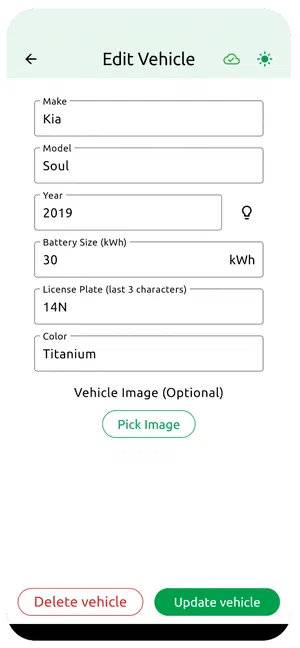
Open the app and tap Vehicles at the bottom left. Tap the plus icon to add your first vehicle — you can always add more later.
- Make: the brand or manufacturer
- Model: the specific model
- Year: the year it was manufactured
- Battery size: the battery capacity in kilowatt-hours (kWh)
- License plate: the last three characters only — partial plates keep your data private while helping station owners spot your vehicle
- Color: the vehicle color
- Photo: a photo of your vehicle for easy identification (optional, but nice to have)
Why do we need this information?
When you use a charging station, you’re entering into an agreement with the station owner as defined by their terms of service. The station owner needs to know what vehicle to expect so they can perform spot-checks and discourage unauthorized use. It’s all about keeping things fair for everyone.
Why do we need the battery size?
Battery size is used to estimate the energy transferred during each session. You enter the state of charge before and after each session, and we use that to calculate a retrospective cost per kWh — for informational purposes only. The actual cost of your session is entirely time-based.
You can add, update, or delete vehicles at any time from the same screen.