October 28, 2026
The Same Map, Three Ways: SVG, Rust and Flutter
EVnSteven has reached a comfortable place. The platform is stable and doesn’t need much maintenance, which is exactly what we wanted when we started: a small system that quietly keeps working. That leaves a little room to experiment, and it has left our founders time to start a few other projects, which you’ll find at the end.
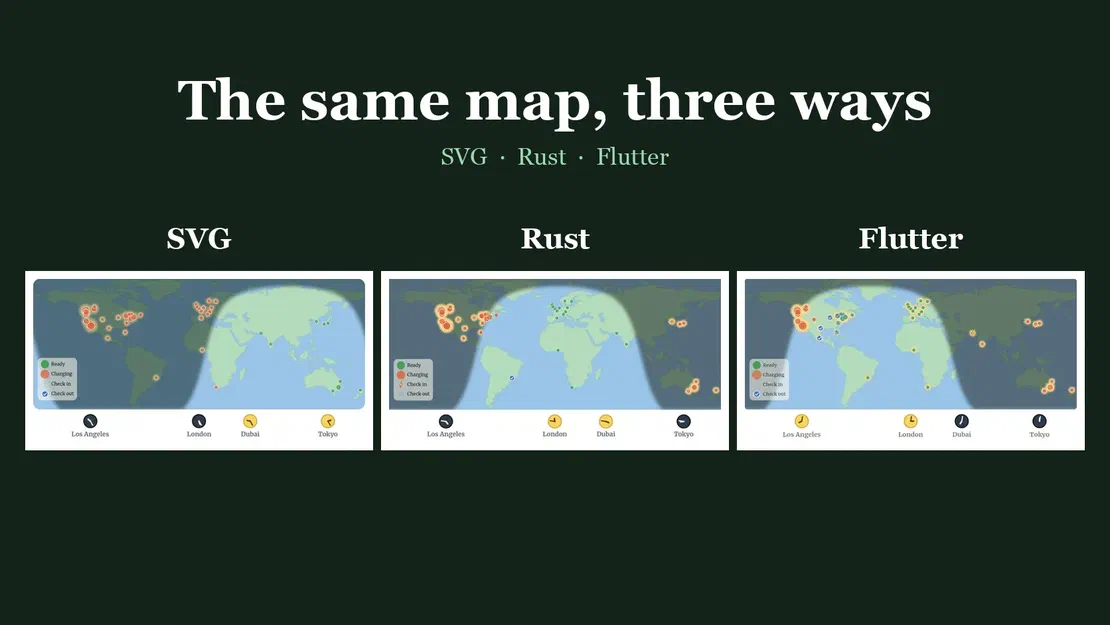
So we ran an experiment. We took the map on our home page and rebuilt it twice: once in Rust compiled to WebAssembly, and once in Flutter. This article puts all three on one page and compares them.
1. The original: SVG, CSS and a little JavaScript
In plain terms: this is the map on our home page. It’s built the way the rest of a web page is built: a drawing made of shapes that your browser already knows how to display and animate. It’s the simplest of the three, and it’s the one most visitors see.
Ready Charging Check in Check out
It’s one SVG drawing. The browser runs most of the animations from CSS, and a small script handles the rest.
In its favour: there’s no build step, so a Hugo template is all it needs. It’s vector, so it stays sharp at any size. All 44 dots can be reached with the keyboard, each with a label for screen readers. And its few words are translated into all of our languages.
The cost is weight in the page. The map’s markup is about 107 KB (about 30 KB compressed), and once running it has about 670 elements and about 200 CSS animations. The logic is also hard to test: the timing lives inside CSS keyframes and a script in the page, so the only test is looking at it.
2. Rust and WebAssembly
In plain terms: Rust is a programming language known for being fast and for catching many mistakes before a program ever runs. Here we wrote the map’s “brain” in Rust, packaged it into a compact form that browsers can run (called WebAssembly), and let it paint the whole map itself, like a painter redrawing one canvas many times a second. To you it looks the same.
The whole map is drawn on a single canvas by Rust that has been compiled to WebAssembly. The Rust code owns all of the map’s behaviour and redraws everything every frame.
The part we liked is that the logic is plain Rust with nothing from the browser in it: the maths for where things go and when they change, and the parser that reads the land outline. It has 13 tests that run in a fraction of a second, and if the cycle’s timing is wrong, a test fails instead of someone noticing it looks odd. About a third of the roughly 1,070 lines of Rust are that tested core (with its tests); the rest draws to the canvas and handles mouse events.
The page ends up very light: one canvas element. But the download is bigger. The compiled module is about 254 KB (about 92 KB compressed) plus about 28 KB of JavaScript glue that the build tool generates. And there are costs we feel when working on it:
- A toolchain. Building needs Rust, the WebAssembly target and a command-line tool whose version must match the library’s exactly. Our build script runs the tests first and stops if one fails.
- No keyboard or screen-reader access to individual cities. A canvas is a picture. The SVG version’s 44 focusable dots are gone.
- English only. The labels are written into the program.
- Blur. The soft shadow edge uses a canvas blur filter, which not every browser supports. We haven’t tested Safari, where the edge may be hard.
3. Flutter
In plain terms: Flutter is a toolkit from Google for building apps that run on phones, computers and the web from one set of code. It doesn’t use the web page’s own building blocks. It draws everything itself. Here the map is a small app shown inside this page, the same toolkit that powers our charging calculator.
It paints the map with a custom painter, and it’s shown here in a frame. Flutter can also build phone and desktop apps from the same code, which is its main argument: write the map once, run it in several places.
It’s the same logic as the Rust map, ported to Dart, with 11 tests. About 1,100 lines including tests. Flutter hands each city to screen readers as a labelled button, which the canvas version lacks (we haven’t checked how well it works with a real screen reader). It’s also the biggest download: the app is about 1.8 MB (about 535 KB compressed). Flutter’s drawing engine is a further download, but the site already shares one copy with the calculator, so a visitor who has opened the calculator doesn’t download it again. Its text is set in the site’s font, Merriweather, which the browser fetches at run time.
What we found
| SVG + CSS + JS | Rust + WebAssembly | Flutter | |
|---|---|---|---|
| Download for the map | about 107 KB, in the page | about 254 KB module + 28 KB glue | about 1.8 MB app (drawing engine shared) |
| Elements in the page | about 670, with about 200 CSS animations | 1 canvas | 1 frame |
| Tests for the logic | none | 13, native | 11, native |
| Cities reachable by keyboard | yes, all 44 | no | exposed to screen readers (not tested) |
| Translated | yes | no, English only | no, English only |
| Stays sharp at any zoom | yes (vector) | redrawn for the screen’s pixel density | redrawn for the screen’s pixel density |
| What it needs to build | nothing | Rust toolchain, matching tool version | Flutter SDK |
One more note on speed. In our check, the SVG map and the Rust map both ran at the screen’s refresh rate (about 120 frames per second on the test display), so frame rate didn’t tell them apart. We didn’t measure Flutter’s frame rate, and we didn’t measure battery or CPU use, so we can’t say which is lighter on a phone.
Things that surprised us
Some details are easy to get wrong. Our first clones drew the key and the clocks at a fixed share of the map, so they shrank on small screens and looked tiny next to the original. The original sizes them in the page’s own font unit (rem, which changes with screen width). The clones now read that size from the page. The clocks differ too: the original’s hands move in 15-minute steps, while in the Rust and Flutter versions they turn continuously.
Time zones were not built in. Neither Rust compiled to WebAssembly nor Dart carries a time-zone database that knows “Asia/Dubai”. Both ask the browser instead, through its built-in Intl service, which also gets daylight saving right.
All three share their inputs. The Rust and Flutter maps read the city list and the land outline from the page they’re on, the same data the SVG map uses. Change a city, and all three change. It also means the maps can only run on a page that provides them.
Flutter web remembers. Flutter web installs its own cache, so after rebuilding it we kept seeing the old version until we cleared it.
Our conclusion
The SVG map stays on the home page. For a drawing this size it’s the lightest, it’s accessible, it’s translated, and it needs nothing to build. Rust is the more interesting runner-up: if we ever need the map’s logic to be provably right, or need to do heavy computation in the browser, a tested Rust core is a good way to do it. Flutter makes sense if the map ever needs to live inside a Flutter app.
An experiment doesn’t need to change the product to be worth running. We ended up with a clearer picture of what each approach costs, a tested description of how the map behaves, and a page where you can see all three for yourself.
What our founders are building next
A stable platform leaves time for other ideas. Besides EVnSteven, our founders are working on these:
 Ride-hailing, launching very soon
Kimem (opens in a new tab)
A ride-hailing service for Bahir Dar, Ethiopia, from founder Mekonnen Alemu. Riders see a fare estimate before they book, watch the nearest driver approach on a map, and pay the metered fare in cash at the end of the trip.
Ride-hailing, launching very soon
Kimem (opens in a new tab)
A ride-hailing service for Bahir Dar, Ethiopia, from founder Mekonnen Alemu. Riders see a fare estimate before they book, watch the nearest driver approach on a map, and pay the metered fare in cash at the end of the trip.
 Non-profit, open source
StrayCats (opens in a new tab)
A project from David to help people who care for street cats, stray cats, or any cat, even if that cat happens to be a dog. It's still at the idea stage, with no app yet, and David would love your ideas and feedback. Dedicated to Saibo, 2010–2026.
Non-profit, open source
StrayCats (opens in a new tab)
A project from David to help people who care for street cats, stray cats, or any cat, even if that cat happens to be a dog. It's still at the idea stage, with no app yet, and David would love your ideas and feedback. Dedicated to Saibo, 2010–2026.
 Cash tracking, free, launching soon
Effectivo (opens in a new tab)
Imperfect accounting with a twist, for those who use cash. Log a purchase in a few taps, count what's in your wallet, and look back at what was worth it. The twist is that everyone who keeps using cash helps keep it around for everyone else. Free and ad-free, coming to Android and iPhone, with a beta and a web demo running now.
Cash tracking, free, launching soon
Effectivo (opens in a new tab)
Imperfect accounting with a twist, for those who use cash. Log a purchase in a few taps, count what's in your wallet, and look back at what was worth it. The twist is that everyone who keeps using cash helps keep it around for everyone else. Free and ad-free, coming to Android and iPhone, with a beta and a web demo running now.Your building is ready for EV charging.
Charge EVs at the outlets you already have. Drivers pay for the time they use.
Get EVnStevenSubscribe to EVnSteven Notes
We use your email only to send these notes. Unsubscribe from any email. Privacy policy